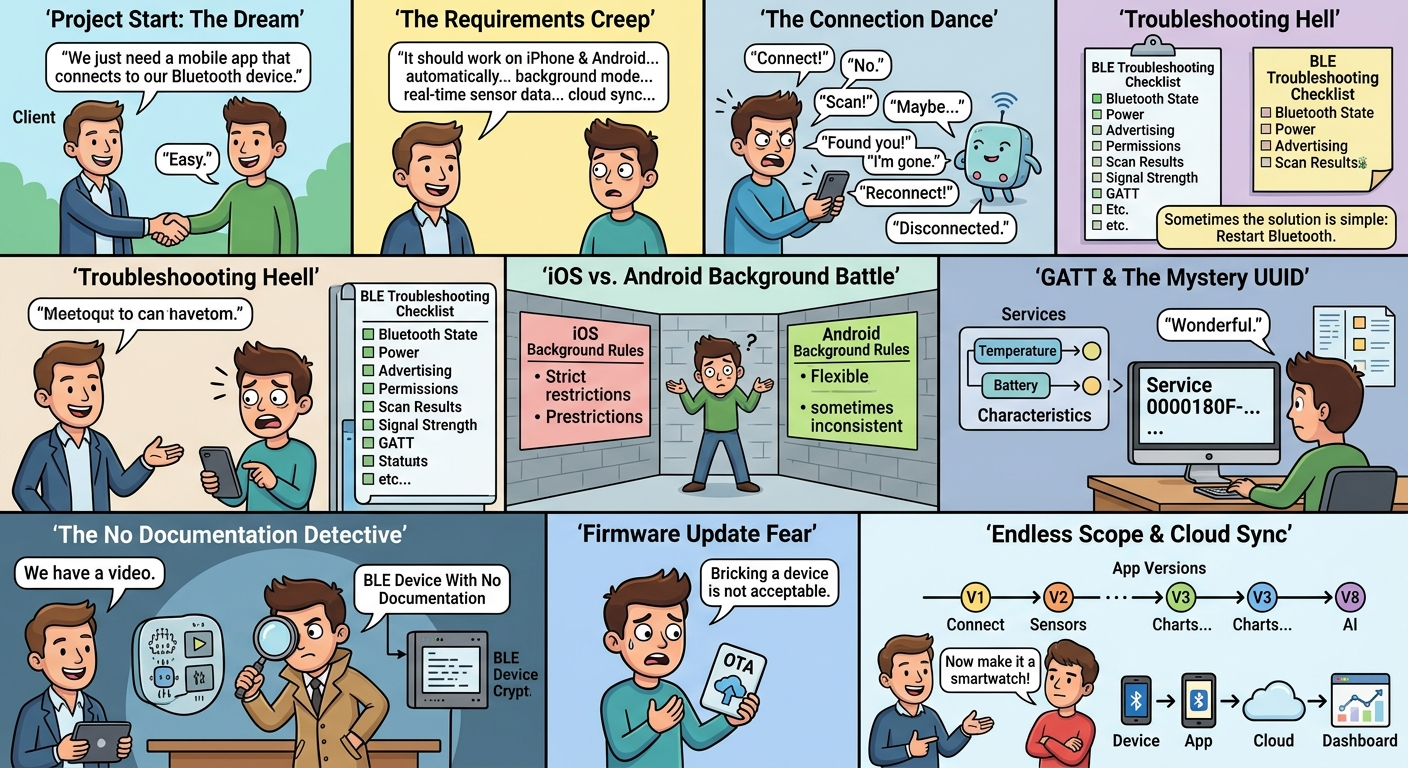
Every BLE app development project begins with one beautiful sentence:
“We just need a mobile app that connects to our Bluetooth device.”
Developer:
“Easy.”
Then the client continues:
“It should work on iPhone and Android.”
Okay.
“It should connect automatically.”
Sure.
“It should work in the background.”
Hmm.
“It should show real-time sensor data.”
Fine.
“Can users update the device firmware from the app?”
Okay.
“Can we also add cloud synchronization?”
Sure.
“And maybe AI analytics?”
…
Welcome to BLE app development. 😂
What Is BLE App Development?
BLE app development involves creating mobile applications that communicate with Bluetooth Low Energy devices.
A typical architecture looks like:
BLE Device 📡
↓
Bluetooth Low Energy 🔵
↓
iOS / Android App 📱
↓
Cloud ☁️
↓
Dashboard / Analytics 📊
The user sees:
Device Connected ✅
The developer sees:
Scanner → Peripheral → GATT → Service → Characteristic → Notification → Reconnection → Background Mode
😂
The BLE Connection: A Complicated Relationship
Developer:
“Connect to the device.”
BLE device:
“No.”
Developer:
“Scan again.”
BLE device:
“Maybe.”
Developer:
“Found you!”
BLE device:
“I’m gone.”
Developer:
“Reconnect.”
BLE device:
“Okay.”
Developer:
“Great!”
BLE device:
Disconnected.
😂
Every BLE developer eventually develops a special relationship with the Bluetooth logs.
“But Bluetooth Is ON!”
This is another classic.
User:
“My Bluetooth is ON.”
Developer:
“Great. Can the app see the device?”
User:
“No.”
Developer:
“Is the device powered on?”
User:
“Yes.”
Developer:
“Is it advertising?”
User:
“What’s advertising?”
😂
BLE troubleshooting can involve checking:
- Bluetooth state
- Device power
- Advertising
- Permissions
- Scan results
- Signal strength
- Services
- Characteristics
- Connection state
- Firmware compatibility
Sometimes the solution is simple.
Sometimes the solution is:
Restart Bluetooth.
And somehow…
It works. 😂
The Famous “Works on Android”
Developer:
“The BLE device works perfectly on Android.”
Client:
“Great!”
Then someone tests on iPhone.
Nothing.
😂
Then the team discovers that iOS and Android handle BLE and background behavior differently.
A serious BLE app should be tested across supported:
- iOS versions
- Android versions
- Smartphone models
- Bluetooth chipsets
- Device firmware versions
Because:
One successful test phone does not equal a production-ready BLE application.
GATT: The BLE Language Everyone Eventually Learns
If you’re new to BLE development, you’ll quickly hear:
GATT
It stands for Generic Attribute Profile.
BLE devices organize their data through:
- Services
- Characteristics
- Descriptors
Imagine a device exposing:
Battery Service
→ Battery Level
And:
Temperature Service
→ Temperature Characteristic
The mobile application communicates with those characteristics to read, write, or receive updates.
At first:
“What is a characteristic?”
After a few BLE projects:
“Check characteristic UUID 2A6E.”
😂
The Mystery UUID
Every BLE developer has seen something like:
0000180F-0000-1000-8000-00805F9B34FB
And thought:
“Wonderful.”
😂
UUIDs identify BLE services and characteristics.
Standard UUIDs can represent standardized services.
Custom products may use custom UUIDs.
The important thing is that the mobile application and BLE firmware agree on the communication structure.
Otherwise:
App: “Give me temperature.”
Device: “Here’s battery percentage.”
App: “That’s not what I asked.”
😂
The BLE Device With No Documentation
Client:
“We already have the hardware.”
Developer:
“Great. Do you have the BLE protocol?”
Client:
“No.”
“GATT documentation?”
“No.”
“SDK?”
“No.”
“Firmware source?”
“No.”
“Technical documentation?”
Client:
“We have a video.”
Developer:
😐
And that’s how a BLE developer becomes a detective.
The “Simple Sensor App”
Client:
“The device only measures temperature.”
Easy.
Then:
“It also measures humidity.”
Okay.
“Battery level too.”
Fine.
“Can users change the measurement interval?”
Sure.
“Can they download the data?”
Okay.
“Can they see historical graphs?”
Yep.
“Can they share reports?”
Sure.
“Can the device update firmware from the app?”
…
😂
The “simple sensor app” has officially become a complete connected-device platform.
BLE Scanning: The App’s Favorite Hobby
The app starts scanning.
Device 1
Device 2
Device 3
Random Headphones
Smartwatch
Unknown Device
Your Neighbor’s Speaker
😂
BLE scanning can discover many nearby devices.
A production application therefore needs sensible filtering and device identification.
Otherwise the user might see:
“Select your device.”
And the list looks like:
Unknown 1
Unknown 2
Unknown 3
BT Device
LE-123
Something-7A
😂
Automatic Connection Sounds Great
Client:
“Can the app automatically reconnect?”
Developer:
“Yes, depending on the device and platform behavior.”
Client:
“Perfect.”
Then the user walks away.
Bluetooth signal disappears.
User comes back.
App:
Device disconnected.
User:
“Why didn’t it reconnect?”
Developer:
“Let’s check the connection lifecycle.”
😂
Reliable reconnection requires thoughtful handling of:
- Connection state
- Timeouts
- Device availability
- Background restrictions
- Retry logic
- Signal loss
- App lifecycle
Background BLE: Where Things Get Serious
Client:
“The app should keep receiving data even when the user isn’t looking at it.”
Developer:
“Okay.”
Client:
“And even if the app isn’t open?”
Developer:
😐
Mobile operating systems place restrictions on background activity.
BLE applications therefore need platform-specific architecture and testing.
The lesson:
“Background BLE” should be a requirement discussed at the beginning—not two days before launch.
😂
iOS vs Android: The Eternal Debate
iOS Developer:
“It works.”
Android Developer:
“It works.”
QA:
“It doesn’t work on this phone.”
Everyone:
😐
Mobile BLE applications must account for differences in:
- Permissions
- Bluetooth APIs
- Background execution
- OS lifecycle
- Device compatibility
- Power management
That’s why real-device testing matters.
The Battery Problem 🔋
BLE is designed for low-power communication.
But that doesn’t mean developers can communicate with a device constantly without considering battery usage.
Imagine:
Connect
→ Read
→ Write
→ Notify
→ Scan
→ Reconnect
→ Scan again
→ Send data
→ Repeat
Battery:
“I have had enough.”
😂
Good BLE application architecture considers:
- Connection intervals
- Scan duration
- Data frequency
- Notification usage
- Device sleep modes
- Synchronization strategy
“Can We Show Real-Time Data?”
Client:
“We need real-time sensor data.”
Developer:
“How real-time?”
Client:
“Instant.”
Developer:
“Every second?”
Client:
“Even faster.”
Developer:
“Why?”
Client:
“Because real-time sounds better.”
😂
The correct update frequency depends on the actual business requirement.
Sometimes:
1 second
makes sense.
Sometimes:
10 seconds
is perfectly sufficient.
Sometimes:
Once every minute
is enough.
More data isn’t automatically better.
Notifications: The BLE App’s Superpower
BLE devices can send updates to the mobile app through notifications.
For example:
Temperature changes
↓
BLE Notification
↓
Mobile App
↓
UI Updates
This is useful for:
- Sensor monitoring
- Wearables
- Medical devices
- Fitness products
- Industrial equipment
- Smart products
Instead of constantly asking:
“Did the value change?”
the app can subscribe to updates.
Much smarter.
And much less annoying.
😂
Firmware Updates From the App
Then comes the big request:
“Can the app update the device firmware?”
Yes—if the hardware and firmware architecture support an appropriate OTA update mechanism.
But OTA firmware updates can involve:
- Firmware files
- BLE transfer
- Version checking
- Validation
- Progress tracking
- Error handling
- Recovery
- Battery requirements
Because:
Bricking a device is not an acceptable user experience. 😂
The BLE Log That Nobody Wants to Read
When everything works:
Connected.
When everything fails:
Error 133
Developer:
“Hmm.”
😂
BLE logs can contain connection events, service discovery information, characteristic operations, errors, and state changes.
A good development process includes proper logging so the team can understand:
What happened?
When did it happen?
Why did it happen?
What should happen next?
The “One More Feature” Problem
BLE project:
Version 1
Connect device.
Version 2
Add sensor readings.
Version 3
Add charts.
Version 4
Add cloud sync.
Version 5
Add user accounts.
Version 6
Add OTA updates.
Version 7
Add notifications.
Version 8
Add AI.
Client:
“Now can we make it a smartwatch?”
😂
That’s why good BLE app development starts with a clear product roadmap.
BLE App + Cloud
BLE handles local communication.
But many modern connected applications also need cloud services.
A typical architecture can be:
BLE Device
↓
Mobile App
↓
Secure API
↓
Cloud
↓
Database
↓
Dashboard
This allows users to access information beyond the immediate Bluetooth connection.
For example:
Device → App → Cloud
Then later:
User logs in → Cloud → Historical Data
What Happens When Bluetooth Disconnects?
This is an important question.
A good BLE app shouldn’t simply crash or lose everything.
Depending on the product, it may need:
- Local caching
- Retry logic
- Reconnection
- Synchronization
- Offline mode
- Connection-state indicators
The user should ideally understand:
“Device disconnected. We’ll sync when it reconnects.”
Instead of:
“Something went wrong.”
😂